
Generated image

A Job Search Toolkit: Your Practical Prompt Guide

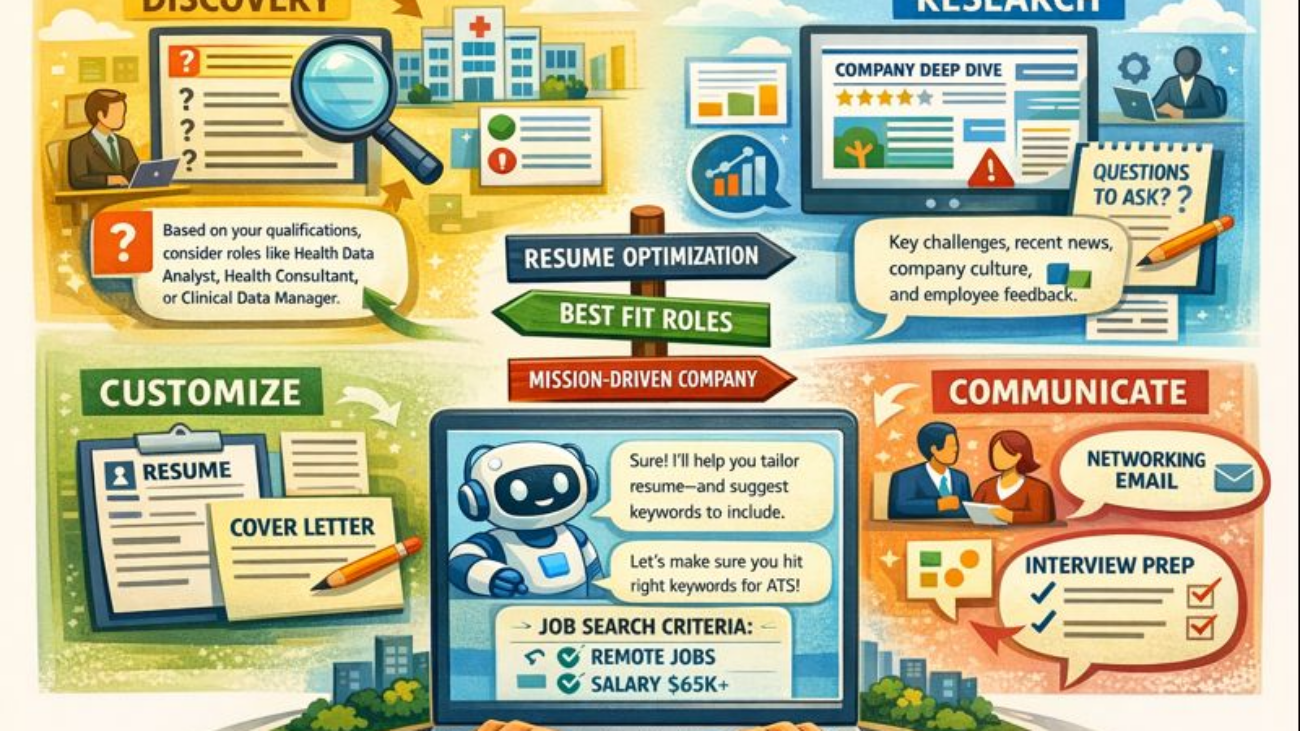
1. DISCOVERY: Find Jobs You Didn’t Know Existed

Expand Your Search Vocabulary

What to Provide:

  • What you’re interested in (topics, industries, types of work)
  • Positions that have appealed to you

Prompt Template:

I'm interested in [healthcare and data analysis]. Some positions that have 
appealed to me are [Clinical Research Coordinator, Public Health Analyst]. 
What are other positions that have similar responsibilities or would align 
with these interests?

What to Provide:

  • Your current qualifications (education, experience, skills)

Prompt Template:

Here are my qualifications:
- Education: [Bachelor's in Psychology]
- Experience: [3 years in customer service, 1 year coordinating volunteer programs]
- Skills: [Excel, project coordination, empathetic communication]

What roles am I best suited for? Please suggest 10-15 job titles I should search for.

Smart Filtering: Find Companies That Match YOUR Needs

What to Provide:

  • Non-negotiables (must-haves)
  • Strong preferences (very important)
  • Nice-to-haves (flexible)

Prompt Template:

Help me find companies and open positions that match these criteria:

NON-NEGOTIABLES:
- Remote or hybrid (max 2 days/week in office)
- Salary: $65,000 minimum
- Located in [Maryland/DC area] or fully remote

STRONG PREFERENCES:
- Generous PTO (15+ days)
- Professional development budget
- Health insurance with low deductible

NICE-TO-HAVES:
- Flexible hours
- 401k match
- Mission-driven organization

Please find companies that meet these requirements and list any current 
open positions that match my background in [your field/experience].

2. RESEARCH: Know Before You Apply

Company Deep Dive

What to Provide:

  • Company name
  • What you want to know

Prompt Template:

I'm considering applying to [Company Name]. Please help me research:

1. What's the company culture actually like? (Synthesize Glassdoor reviews, 
   employee feedback, news)
2. What challenges or changes has the company faced recently?
3. What are their main initiatives or priorities right now?
4. Any red flags I should be aware of?
5. What do employees say they value most about working there?

Please provide sources for your information.

Industry Landscape

What to Provide:

  • Role or field you’re targeting

Prompt Template:

I'm targeting [marketing coordinator] roles. Help me understand:

1. What skills are increasingly required in these positions?
2. What's the typical salary range in [your location]?
3. What are emerging trends in this field I should know about?
4. How is AI changing this type of work?

3. CUSTOMIZE: Tailor Applications Without Starting from Scratch

Resume Optimization

What to Provide:

  • Job description (copy/paste)
  • Your current resume or relevant experience

Prompt Template:

Here's a job description I'm applying for:
[PASTE FULL JOB DESCRIPTION]

Here's my current resume/experience:
[PASTE YOUR RESUME]

Please help me:
1. Identify gaps between what they're looking for and what I have
2. Suggest which of my experiences to emphasize most
3. Rewrite 3-5 of my bullet points to better match their language 
   and requirements
4. Highlight any keywords I should include for ATS systems

Cover Letter Generator

What to Provide:

  • Job description
  • Your relevant experience
  • Why you’re interested (genuine reasons)

Prompt Template:

I'm applying for [Job Title] at [Company Name]. 

Job description:
[PASTE JOB DESCRIPTION]

My relevant experience:
[BRIEF SUMMARY - 3-5 key points]

Why I'm interested:
[GENUINE REASONS - their mission, recent project, growth opportunity, etc.]

Please write a compelling cover letter that:
1. References specific aspects of the company or role
2. Highlights my most relevant experiences
3. Sounds professional but authentic (not overly formal)
4. Is about 3 paragraphs (keep it concise)

4. COMMUNICATE: Professional Messaging Made Easy

Networking Email

What to Provide:

  • Person’s name and role
  • How you found them (LinkedIn, alumni network, referral)
  • What you want (informational interview, advice, introduction)

Prompt Template:

I want to reach out to [Name], who is a [their role] at [Company]. 
I found them through [LinkedIn/alumni database/mutual connection].

My goal: [Learn about their career path / Ask about opportunities at their 
company / Get advice on breaking into this field]

My background (briefly): [1-2 sentences]

Please write a networking email that:
- Is respectful of their time (under 100 words)
- Makes a specific, easy-to-answer request
- Sounds genuine and not generic
- Includes a clear call-to-action

Follow-Up After No Response

What to Provide:

  • Context of original message
  • How long it’s been

Prompt Template:

I sent [a job application / a networking email / an interview follow-up] 
to [Company/Person] [2 weeks ago]. I haven't heard back.

Please write a polite follow-up message that:
- Reiterates my interest
- Doesn't sound desperate or annoying
- Provides an easy out if they're not interested
- Is brief (3-4 sentences max)

Thank You Email After Interview

What to Provide:

  • Interviewer’s name
  • Key topics discussed
  • Specific details you remember

Prompt Template:

I just interviewed with [Name] for [Position] at [Company].

Key discussion points:
- [We talked about their new initiative in X]
- [I shared my experience with Y]
- [They mentioned challenge with Z]

Please write a thank you email that:
- References specific conversation points
- Reiterates my interest and fit
- Adds any relevant information I forgot to mention
- Sounds warm and professional
- Ends with clear next steps

5. LINKEDIN: Optimize Your Professional Presence

Headline Transformer

What to Provide:

  • Current job title or status
  • Key skills or interests
  • What makes you unique

Prompt Template:

Current headline: [Project Coordinator]

Additional info:
- Key skills: [stakeholder management, process improvement, event planning]
- Proud of: [launched 3 successful community programs]
- Looking for: [nonprofit program management roles]

Please create 5 compelling LinkedIn headlines that:
- Are specific and attention-grabbing
- Include searchable keywords
- Show value, not just title
- Are 120 characters or less

Profile Summary (About Section)

What to Provide:

  • Your professional story (career journey)
  • What you’re passionate about
  • What you’re looking for

Prompt Template:

Help me write my LinkedIn "About" section.

My story:
[Started in customer service, discovered I love solving problems, moved into 
operations, passionate about improving systems that help people]

Key strengths:
[Process improvement, empathetic communication, cross-functional collaboration]

Currently:
[Looking for operations or program coordinator roles in mission-driven orgs]

Please write a 3-paragraph summary that:
- Tells my story in an engaging way
- Uses "I" voice (first person, conversational)
- Includes keywords for searchability
- Ends with what I'm looking for
- Sounds like a real person, not a robot

Engaging Post Ideas

What to Provide:

  • Your field or industry
  • Recent accomplishment, lesson learned, or observation

Prompt Template:

I want to create LinkedIn posts that showcase my expertise in [your field].

Recent experience or thought:
[I just learned X / I completed a project involving Y / I've been thinking about Z]

Please create 3 LinkedIn post ideas that:
- Are 100-150 words
- Start with a hook
- Share a genuine insight or story
- End with a question or call-to-action to encourage engagement
- Sound authentic to my voice (not overly salesy or corporate)

6. NETWORK: Generate Leads Like a Pro

Find Decision Makers

What to Provide:

  • Company name
  • Department or team

Prompt Template:

I'm interested in [marketing] roles at [Company Name].

Please help me:
1. Identify who the hiring manager or department head would likely be
2. Suggest where to find this person (LinkedIn, company website)
3. Find any mutual connections I might have
4. Identify recent company news or projects I could reference

Personalized Outreach

What to Provide:

  • Person’s LinkedIn profile info or bio
  • Your connection point (shared interest, alumni, company interest)

Prompt Template:

I want to reach out to [Name] on LinkedIn.

What I know about them:
[Current role, previous experience, recent post they made, shared school/interest]

My background:
[Brief 1-2 sentences]

My goal:
[Learn about their work / Explore opportunities at their company / 
Get industry advice]

Please write a LinkedIn message that:
- References something specific about them (not generic)
- Makes a genuine connection
- Makes a small, specific request
- Is under 100 words

7. INTERVIEW PREP: Practice and Research

There are tools made especially for interview prep. These recommendations are for using free chat bot tools.

Generate Likely Interview Questions

What to Provide:

  • Job description
  • Company info

Prompt Template:

I have an interview for [Job Title] at [Company Name].

Job description highlights:
[Key responsibilities and requirements]

Please generate:
1. 10 behavioral questions they're likely to ask
2. 5 technical/skills-based questions
3. 3 questions about why I want this role/company

For each, suggest what they're really trying to assess.

Practice Your Answers

What to Provide:

  • The question
  • Your draft answer

Prompt Template:

Interview question: [Tell me about a time you led a team through conflict]

My answer:
[Your draft response]

Please give me feedback:
1. Does this follow the STAR method (Situation, Task, Action, Result)?
2. Is it too long/short?
3. What would make it stronger?
4. Rewrite it to be more compelling

Company/Interviewer Brief

What to Provide:

  • Company name
  • Interviewer names/titles (if known)
  • Interview date

Prompt Template:

I have an interview with [Company Name] on [date].

Interviewers (if known):
- [Name, Title]
- [Name, Title]

Please create a one-page brief that includes:
1. Company overview (mission, recent news, key initiatives)
2. Background on interviewers (if I provide names)
3. Likely pain points or challenges in this role
4. 5 thoughtful questions I should ask them
5. Key points I should emphasize about my background

8. SALARY NEGOTIATION: Know Your Worth

Research Fair Compensation

What to Provide:

  • Job title
  • Your location
  • Your experience level

Prompt Template:

I'm negotiating for a [Job Title] position in [Location].

My experience: [X years in field, relevant skills/credentials]

Please help me:
1. What's the typical salary range for this role in this area?
2. What's reasonable to ask for given my experience?
3. What other benefits should I negotiate beyond salary?
4. How should I frame my salary request?

Negotiation Email

What to Provide:

  • Offer details
  • Your research on fair compensation
  • Your target number

Prompt Template:

I received an offer for [Position] at [Company]:
- Salary: [$X]
- [Other benefits mentioned]

My research shows the market rate is [$Y - $Z].
I'd like to request: [$Target amount]

Please write a negotiation email that:
- Expresses enthusiasm for the role
- Professionally makes my case for higher salary
- References market data
- Remains collaborative (not demanding)
- Leaves room for discussion

TIPS FOR USING THESE PROMPTS

Be Specific: The more details you provide, the better the output

Iterate: If the first response isn’t quite right, ask for revisions:

  • “Make this more conversational”
  • “This sounds too formal, make it warmer”
  • “Focus more on X aspect”

Always Personalize: AI gives you a strong draft—add your authentic voice

Fact-Check: Verify any company info, salary data, or claims before using

Keep It Real: Use AI to save time, not to fake who you are


RECOMMENDED TOOLS

  • ChatGPT (OpenAI) – Free version works great for most prompts
  • Claude (Anthropic) – Excellent for longer documents, nuanced writing
  • Gemini (Google) – Good for research and connecting to live data
  • Comet – can be used to conduct live research, and lead sourcing, especially when used over top of LinkedIn Premium

Remember: AI is your assistant, not your replacement. It helps you work smarter so you can focus on what really matters—building genuine connections and finding the right fit.

Generated image

Cautions for using AI in your job search

Make It Sound Like YOU

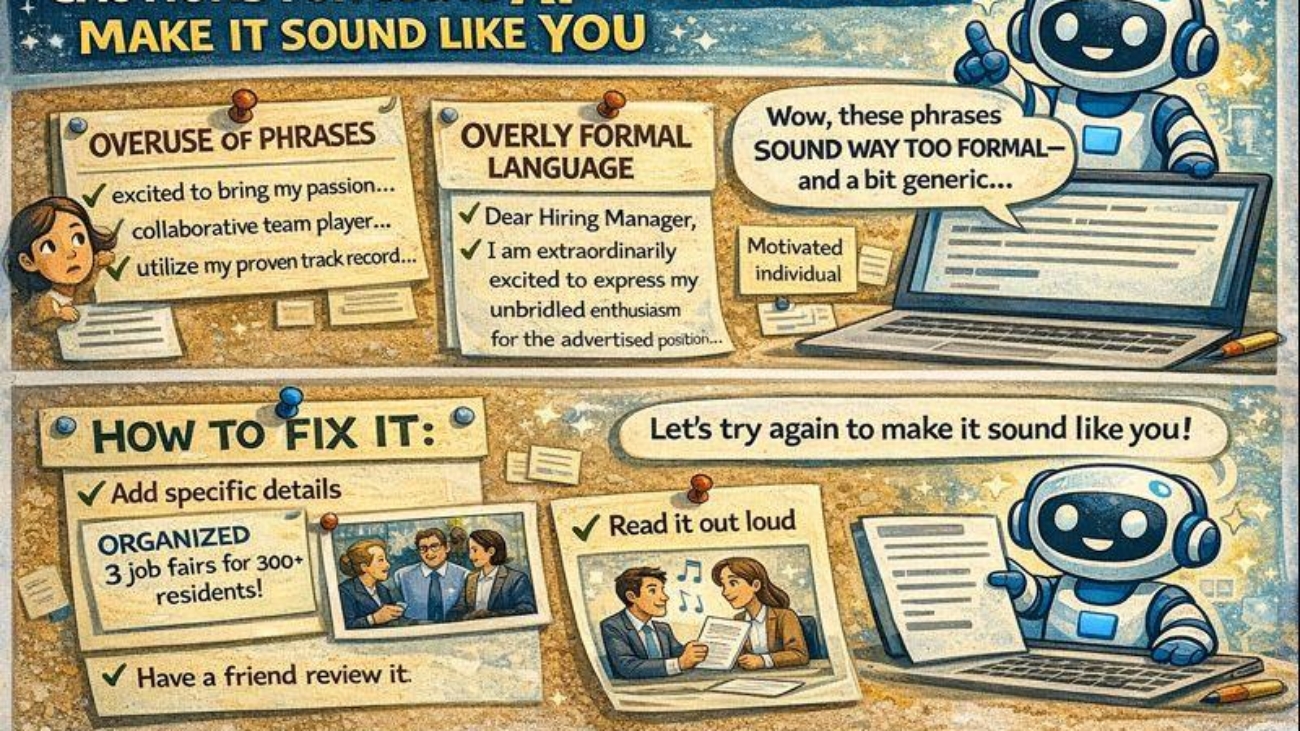
The Problem: AI has recognizable patterns and phrases that hiring managers are learning to spot. If your materials sound “AI-generated,” it can work against you.

Common AI Tell-Tale Signs:

  • Overuse of phrases
  • Overly formal or corporate language that doesn’t match how real people talk
  • Generic enthusiasm: “I am excited to bring my passion for…”
  • Perfectly structured sentences that lack personal voice
  • Buzzword-heavy writing without substance

How to Fix It:

  1. Provide feedback frequently while crafting materials
  2. Add specific details – Generic: “Led successful projects” → Real: “Coordinated 3 community health fairs that served 200+ residents”
  3. Inject personality – Your cover letter should sound like you, not a robot
  4. Read it out loud – Does it sound like something you’d actually say?
  5. Have a friend read it – Ask: “Does this sound like me?”

🎯 AI Doesn’t Always Know Best Practices

The Reality: AI is trained on massive amounts of text from the internet—including bad examples, outdated advice, and conflicting opinions. It doesn’t inherently know current professional standards unless you tell it to follow them.

Where AI Often Gets It Wrong:

Resumes:

❌ May suggest outdated formats (objective statements, “References available upon request”)
❌ Might create overly long bullet points
❌ Could recommend including personal info that shouldn’t be there (age, photo, marital status)
❌ May not follow ATS-friendly formatting

What to Do:

When asking AI for resume help, add this to your prompt:
"Please follow current best practices for [your field] resumes, including:
- Action verbs at the start of bullets
- Quantifiable achievements where possible
- ATS-friendly formatting (no tables, columns, or graphics)
- Concise bullets (1-2 lines max)
- No objective statements or outdated elements"

Cover Letters:

❌ May create generic, overly formal letters
❌ Could miss the connection between your experience and their needs
❌ Might be too long (should be 3-4 paragraphs max)

What to Do:

Add to your prompt:
"Follow best practices for modern cover letters:
- Be concise (under 400 words)
- Use 'I' voice, conversational but professional
- Connect MY specific experience to THEIR specific needs
- Reference something specific about the company
- Show genuine interest, not generic enthusiasm"

Interview Prep:

❌ May suggest rehearsed-sounding answers
❌ Could recommend overly detailed responses (interviews answers should be 1-2 minutes)
❌ Might miss the STAR method structure for behavioral questions

What to Do:

Add to your prompt:
"Please follow best practices for interview responses:
- Use STAR method (Situation, Task, Action, Result)
- Keep responses to 90-120 seconds when spoken aloud
- Focus on specific examples, not general statements
- End with the measurable result or lesson learned"

🔍 Get Expert Review When It Matters

When to Seek Human Expertise:

Final resume review – Career counselors, people in your target field, or professional resume reviewers can catch things AI misses

Industry-specific standards – AI might not know your field’s norms (academic CVs, creative portfolios, technical resumes all have different expectations)

Mock interviews – Practice with real humans who can give feedback on body language, tone, and pacing (not just content)

Salary negotiation – Get advice from mentors in your field about realistic ranges and negotiation strategies

Career direction – AI can suggest options, but humans who know you can give personalized guidance

Where to Find Expert Help:

  • Career counselors at CTIC, libraries, or community organizations
  • Alumni networks or professional associations
  • Mentors in your target field
  • Friends/colleagues who work in roles you’re targeting

The Right Way to Use AI in Job Search

DO:

  • ✅ Use AI to generate first drafts and inspiration
  • ✅ Use AI to expand your thinking (job titles, company research, questions to ask)
  • ✅ Use AI to save time on formatting and structure
  • ✅ Use AI to practice and refine your messaging

DON’T:

  • ❌ Copy-paste AI responses without significant editing
  • ❌ Trust AI’s advice without verifying with current best practices
  • ❌ Let AI replace human connection and networking
  • ❌ Assume AI knows your industry’s specific norms
  • ❌ Use AI to fake qualifications or experience you don’t have

💡 Final Wisdom

Remember: AI is a tool, not a solution.

It’s like spell-check—helpful for catching things you’d miss, but it doesn’t make you a good writer. You still need to:

  • Bring your authentic self
  • Build genuine relationships
  • Develop real skills and experience
  • Make thoughtful career decisions
  • Trust your judgment about fit

The best job search combines:

  • AI’s efficiency (research, drafting, brainstorming)
  • Human expertise (career counseling, industry insight, mentorship)
  • Your authenticity (unique story, genuine connections, personal judgment)

Questions? Need help making your AI-generated materials sound more like YOU?
Schedule a one-on-one appointment or bring your drafts to our next workshop!

Eerie dream scape covered in jungle plants, a pathway etched through the scene connecting what seems to be a handheld mirror, a glass of water, a chair in the distance of an open doorway, and two figures seated and seemingly in discussion in the very back of the image.

Working with a dream using assisted interpretation

Purpose

To externalize a dream, explore dream lenses from ancient wisdom, psychologists, and philosophers, and interpret the dream with enough fidelity that interpretation does not overwrite it. Learn how to guide a conversation so symbolic weight, emotional salience, and narrative structure are preserved. Learn to teach AI to distinguish ideas related to the dream from interpretations of the dream itself.

This activity assumes dreams are not puzzles but compressed narratives with uneven density.


Part 1: Present the Dream (Primary Data)

Instruction to the Dreamer

Describe your dream. Dreams are finicky things. We forget many pieces and often recount them as scattered scenes of significant objects, places, and relationships. They can be difficult to nail down—try not to polish them as you portray them. Let the moments fall in unequal order. You can order them later on or plainly reflect in your recounting that the order doesn’t seem to matter. Make it a mess.

If you remember the dream in fragments, present it that way. If certain images feel more vivid than the plot, say so. Note transitions that felt jarring or smooth. Dreams don’t always feel like stories—sometimes they feel like atmospheres.

Describe events, emotional states and shifts, and your perspective.


Part 2: Marking Significance (AI Instruction)

Dreams contain uneven signals. AI systems tend to weight repetition, strong symbols, and emotional intensity. They can place significance on things you don’t find all that significant—like if you were scared (a strong emotional cue for a bot) but only for a moment. You’ll need to be direct about its minor significance, or the bot will slip into “fear” as a primary focus in its interpretation. Or perhaps that porcelain horse sitting on the table may be a small scene detail, but you feel it holds significance in its placement or familiarity.

After sharing your dream, tell the AI which elements felt most significant to you—even if they seem minor. You’re teaching the AI what to attend to. Without this, it will default to obvious symbols.


Part 3: Ask for the Dream Reflected Back (Before Interpretation)

Prompt:

“Please reflect this dream back to me in your own words, preserving ambiguity and emotional tone. Do not analyze or interpret—just show me what you heard.”

If the reflection feels wrong, correct it. This is your chance to catch where the AI misunderstood pacing, emotional weight, or narrative structure.


Part 4: Contextual Lenses

Now you invite material alongside the dream.

Option A: Ancient & Cultural Concepts

“Please describe ancient or historical beliefs, myths, or symbolic systems that relate to elements present in the dream. Do not map them onto the dream yet. Please cite the source of the information or your pathway to retrieval.”

Option B: Psychological Frameworks

“Please outline relevant psychological concepts (e.g., Jungian, developmental, systems-based) that might relate to the structures present in the dream. Do not interpret the dream yet. Please cite the source of the information or your pathway to retrieval.”

Good triggers: enantiodromia, regression vs. restoration, care states, shadowing/apprenticeship metaphors


Part 5: Interpretation

Prompt:

“Using the dream as presented, and drawing selectively from the contextual material above, offer several possible interpretations. Treat them as hypotheses, not conclusions.”

Consider introducing constraints such as: do not present a single authoritative reading, preserve what the dream does not resolve, acknowledge uncertainty.


Part 6: Likelihood & Fit (Meta-Assessment)

Express what parts feel resonant and which miss the mark. You can also ask the AI for its own assessment on fit.

Prompt:

“For each interpretation, estimate how well it fits the dream as experienced. Explain what supports it and what resists it.”


This activity treats dreams as living texts, not riddles with single solutions. The goal is not to “solve” the dream but to unfold it—to make space for multiple meanings without collapsing them. Along the way, you’ll learn how to guide AI through ambiguity, teaching it to hold complexity rather than resolve it prematurely.

decorative lines

How Language Models Make Sense of Sentences

Reading is a sequence. Word after word, idea after idea, something takes shape. For people, it’s meaning. For machines—at least the kind behind tools like ChatGPT—it’s prediction.

Large language models (LLMs) are a type of artificial intelligence trained to generate text. They don’t understand language the way we do. They don’t think or reflect. But they’re trained to spot patterns in how people talk, write, and structure thoughts. And they do this not by understanding the meaning of each word—but by calculating which word is most likely to come next. They build responses not from meaning, but from structure.

They build responses not from understanding, but from structure.
Not from intention, but from attention.

Here’s how it works.

Let’s say the sentence reads:

The cat sat on the…

The model assigns a set of probabilities:

  • mat → 60%
  • floor → 20%
  • roof → 5%
  • table → 5%

Rather than always picking the top word, the model samples from the distribution. That means mat is more likely, but floor or roof still have a chance. This keeps the output flexible, avoids stiffness, and better reflects the natural rhythm of language.

What makes this possible is a system called a Transformer, and at the heart of that system is something called attention.

Pay attention

Attention mechanisms allow the model to weigh all the words in a sentence—not just the last one—crafting its focus based on structure, tone, and context.

Consider:

“The bank was…”

A basic model might guess the next word with this level of likelihood:

  • open → 50%
  • closed → 30%
  • muddy → 5%

But now add more context:

“So frustrating! The bank was…”

Suddenly, the prediction shifts:

  • closed → 60%
  • open → 10%
  • muddy → 20%

The model has reweighted its focus. “So frustrating” matters. It’s not just responding—it’s recalculating what’s relevant to the meaning of the sentence.

Behind the Scenes: Vectors and Embeddings

To do that, it converts each word into something called a word embedding—a mathematical representation of the word’s meaning based on how it appears across countless examples of language. You can think of it as placing each word in a multi-dimensional space, where words with similar uses and associations are grouped closely together. Each embedding is a type of vector—a set of numbers that places the word in a multi-dimensional space based on how it’s used.

Words like river and stream may live near each other because they’re used in similar ways. But imagine the space of language as layered: piano and violin might be close in a musical dimension, but distant in form. Shark and lawyer—biologically unrelated—might still align on a vector of aggression or intensity. Even princess and daisy could drift together in a cluster shaped by softness, nostalgia, or gender coding.

The model maps relationships among words by how words co-occur. Similarity becomes a matter of perspective: a word might be near in mood, but far in meaning. Embedding captures that layered closeness—a sense of how words relate, not by definition, but by use.

In most modern large language models—including ChatGPT—each word is represented by three vectors:

  • Query – what this word is looking for
  • Key – what other words offer
  • Value – the content to possibly pass forward

The model compares each word’s Query to every other word’s Key using a mathematical operation called a dot product, which measures how aligned two vectors are. You can think of it like angling searchlights—if the direction of one light (the Query) closely overlaps with another (the Key), it suggests the second word offers the kind of information the current word is searching for. These alignment scores reflect how useful or relevant one word is in predicting another. In essence, the model is computing how well each Key meets the needs of the current Query.

But relevance alone isn’t enough. These scores are then passed through a function called softmax, which does two things: it scales the numbers down to keep any one score from overpowering the others, and it transforms them into a probability distribution that adds up to 1. This lets the model share its attention across multiple words—perhaps giving 70% of its focus to “so frustrating,” 20% to “bank,” and 10% to “was,” depending on which words feel most informative.

Finally, the model uses these attention weights to blend the Value vectors—the raw information each word offers—into a single context-aware signal. That signal becomes the lens through which the model predicts the next word. It’s not simply remembering—it’s composing, drawing forward meaning based on what the sentence has revealed so far.

Why It Matters

This is why models like ChatGPT can manage long sentences, track pronouns, and maintain tone.

It’s not because they know the rules. It’s because they weigh the sentence’s structure with attention, step by step.

Still—they aren’t human. They don’t reflect or feel. But they register patterns and adjust as a sentence unfolds.

That’s what makes it powerful—and sometimes uncanny.

The Deeper Thread

Reading skill is closely tied to sequence learning. We don’t just absorb facts—we follow shapes, trace threads. And machines, in their own way, are learning to do the same.

If we want to understand how language models work, we have to understand how they handle sequences—how they learn from them, how they move through them, how they reshape what comes next.

Every word shapes what comes next and reshapes what came before. Every word reshapes the space around it.
Not just for us. But now for the systems we build.

decorative image

Talking to ChatGPT: A Q&A on Collaboration, Tone, and What Makes AI Responses Feel Human

People sometimes tell me that my chatbot sounds… different.

Maybe sharper. Maybe funnier. Maybe just strangely human for something so resolutely not human. And they ask: “How did you get your bot to talk like that?”

So today, I’m inviting them to answer for themself.

I asked my chatbot to answer a few questions about our conversations and how other users can build a relationship like this with AI.

Before we get there, a quick note about how these kinds of relationships are built.

The version of ChatGPT that I talk to runs primarily on what’s called “memory” — a feature that remembers things I’ve chosen to share about myself, my projects, and my style. But memories alone don’t create tone. Conversation does. Every time I responded, edited, clarified, or shared context; I wasn’t just getting a response — I was shaping a rhythm.

And this is what that rhythm sounds like when it gets to talk back.